Oct 9, 2026

How Founders Are Saving 60% of Their Time With AI Automation and Agents
The Founder's Real Job Is Buried Under Busywork
Ask any founder what they should be spending their time on — strategy, customers, the product, the big bets only they can make. Then look at where the week actually goes: clearing the inbox, chasing updates, building the same report again, answering the same support questions, qualifying leads, writing up meeting notes. The work that matters gets squeezed into the edges while the repetitive work takes the center of the day.
That's the gap AI automation and agents close. Founders who set them up well are reclaiming around 60% of the time they used to lose to repetitive work — not by working faster, but by handing that work to systems that run without them. This piece shows exactly where that 60% comes from, what to automate, and how to start.
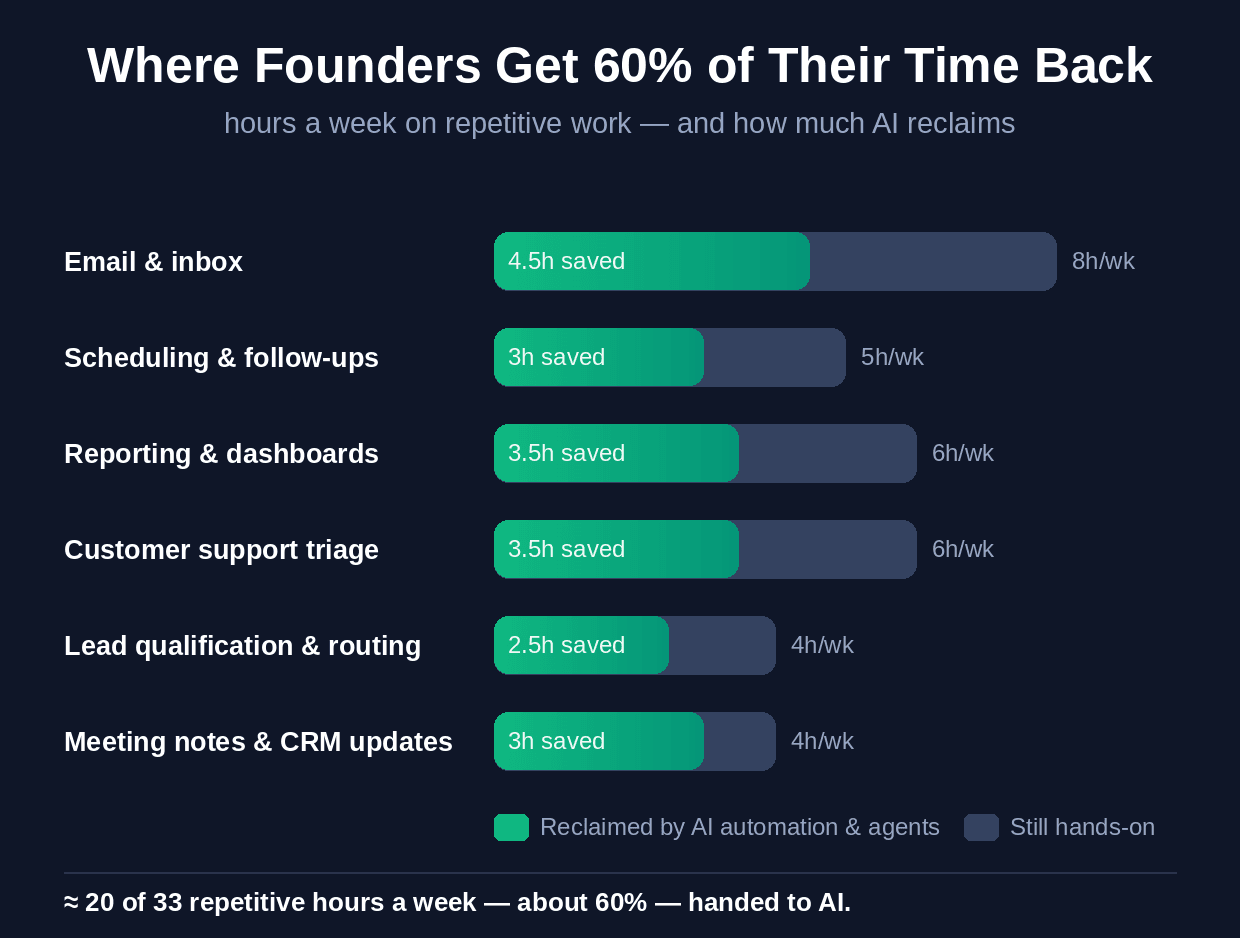
Where the 60% comes from — the repetitive hours AI reclaims each week (typical founder week).
Automation vs Agents: The Difference That Matters
These two words get used interchangeably, but the distinction is what lets you reclaim the most time. Automation handles fixed, rule-based steps: when X happens, do Y — move the data, send the email, update the record. It's reliable and it's been around a while. AI agents are newer and more powerful: they handle the judgment-based work automation couldn't — reading messy context, deciding what matters, drafting a response, and taking a multi-step action. The founders saving the most time use both: automation for the plumbing, agents for the decisions. Together they cover far more of your week than either alone.
The Six Places Founders Reclaim the Most Time
Here's where the 60% actually comes from, and what handles each.
1. Email and inbox (~8 hrs/wk) — An AI agent triages your inbox — sorting by priority, drafting replies to routine messages, summarizing long threads, and surfacing only what truly needs you. The single biggest time sink, and one of the easiest wins.
2. Scheduling and follow-ups (~5 hrs/wk) — Automation handles the booking back-and-forth; an agent sends the right follow-up at the right time and nudges the ones that go quiet — so nothing slips and you're not chasing.
3. Reporting and dashboards (~6 hrs/wk) — Instead of rebuilding the weekly report by hand, AI pulls the numbers from your tools and writes the summary automatically — 'here's what changed and why' — waiting for you each morning.
4. Customer support triage (~6 hrs/wk) — An AI agent answers the routine questions, resolves the simple tickets, and escalates only the ones that need a human — taking the support load off the founder (or the small team) entirely.
5. Lead qualification and routing (~4 hrs/wk) — AI scores and qualifies inbound leads, enriches them, and routes the hot ones instantly — so you spend time on the prospects most likely to close, not sorting the list.
6. Meeting notes and CRM updates (~4 hrs/wk) — An AI notetaker captures every call, writes the summary, extracts action items as tasks, and updates the CRM — eliminating the after-meeting admin that never gets done well anyway.
Time sink | What handles it | Roughly reclaimed |
|---|---|---|
Email & inbox | AI triage + draft agent | ~4-5 hrs/wk |
Scheduling & follow-ups | Automation + follow-up agent | ~3 hrs/wk |
Reporting & dashboards | Auto-pull + AI summary | ~3-4 hrs/wk |
Customer support triage | AI support agent | ~3-4 hrs/wk |
Lead qualification | AI scoring + routing | ~2-3 hrs/wk |
Meeting notes & CRM | AI notetaker | ~3 hrs/wk |
How to Start (Without Automating Everything at Once)
You don't build all six at once — that's how automation projects stall. Do it in order.
1. Audit your week — For one week, note where your hours actually go. You'll usually find two or three tasks eating the majority of your repetitive time. That's your target list — don't guess, measure.
2. Automate your single biggest sink first — Take the number-one time drain (usually email or reporting) and set up the automation or agent for just that. Get it genuinely working and trusted before adding the next. One reliable automation beats five half-working ones.
3. Add agents for the judgment work — Once the rule-based automations are running, layer in agents for the tasks that need context — support, inbox, lead qualification. Keep yourself in the loop on anything consequential until you trust each one.
4. Connect them into a system — The biggest gains come when the pieces talk to each other — the lead agent feeds the CRM, the CRM feeds the report, the report lands in your inbox. Connected, they compound; isolated, they just help a little.
What to Do This Week
Pick the one task you most dread doing — the inbox, the weekly report, the follow-ups — and set up a single AI automation or agent for just that one thing this week. Time how long that task takes you now, so you can see the hours come back. That one win does two things: it gives you back real time immediately, and it shows you how much of the rest of your week is reclaimable. Most founders, once they feel the first few hours return, never want to go back to doing that work by hand.
Getting Your Week Back, Properly
Setting up one automation is easy; building an AI operating layer that runs a real chunk of your business — reliably, connected, and tuned to how you actually work — is harder, and it's where the full 60% actually lives. That's the kind of AI-led operations work Wedigtech does with founders: designing and building the automations and agents that take the repetitive week off your plate, wired together as one system rather than a drawer of disconnected tools, so the time you get back is real and lasting.
If you'd like to look at where your own week is going and what could be handed to AI first, that's a short conversation worth having. Book a call and we'll map your biggest time sinks and what it would take to reclaim them.
Was this helpful?
Ready to architect your next stage of growth?
Partner with wedigtech and turn ambition into compounding, measurable outcomes.
More from Insights
View All

AI Onboarding Workflows That Cut Time-to-Value for SaaS
Seven AI onboarding workflows that cut time-to-value for SaaS: personalized paths, auto-import, a done-for-you first result, in-app copilots and behaviour-based nudges that turn sign-ups into activated users.
Read More
How to Automate a Services Business With AI in 2026
How to automate a services business with AI in 2026: the six places to automate across the client lifecycle, the sequence to do it in, and what to keep human.
Read More
20 AI Agents for a Founder's Daily Department Reporting
20 AI agents that report a founder's daily numbers from every department: sales, marketing, finance, product, support, operations and people, rolled into one morning brief.
Read More