Sep 7, 2026

How to Build an AI-Powered Shopify Store App (Step-by-Step, 2026)
AI in a Shopify Store Is No Longer Optional — and It's Buildable
Shoppers now expect to interact with a store the way they interact with AI everywhere else: they want to ask for what they need, get personalised recommendations, and be guided rather than left to dig through menus. On Shopify specifically, AI-powered search and discovery have moved from nice-to-have to conversion driver — they directly impact conversions, revenue, and customer experience, as Wiser's 2026 analysis puts it. And the tooling to build it — Shopify's app framework plus hosted language models — is now mature enough that an AI-powered Shopify app is a focused build, not a research project.
This guide is that build. It covers the AI features worth adding, the exact plan to build the app, the tech stack for each piece, and how to launch. Whether you're a D2C brand adding AI to your own store or a founder building a Shopify app, the path is the same.
What You're Building — and the AI Features That Matter
An AI-powered Shopify app is an embedded app that adds intelligent features to a store. It uses Shopify's APIs to read the store's data (products, collections, orders) and a hosted language model to power the experiences, then surfaces those experiences in the storefront and the admin. Here are the six features that move the needle — and you do not build all of them at once.
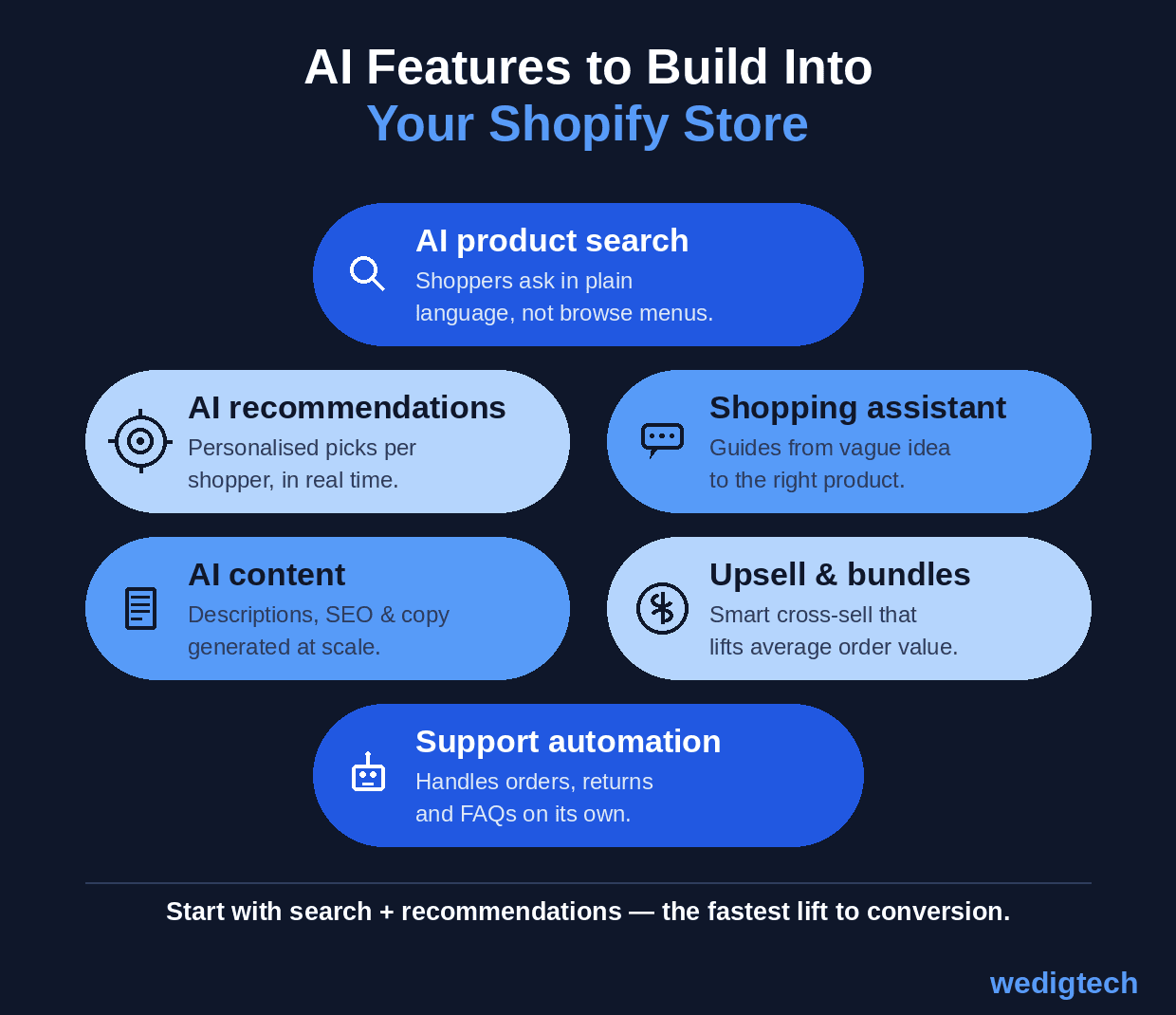
Six AI features to build in — start with search and recommendations for the fastest conversion lift.
AI product search lets shoppers ask in plain language and returns relevant results even with typos or vague queries. AI recommendations personalise the products each shopper sees based on their behaviour. A shopping assistant guides a customer from a vague idea to the right product through conversation. AI content generation produces descriptions, SEO copy, and variants at scale. Upsell and bundles use AI to cross-sell at cart and checkout, lifting average order value. And support automation handles orders, returns, and FAQs without a human. Search and recommendations are the highest-impact place to start, because they act directly on the moment a shopper is deciding what to buy.
The Build Plan, Step by Step
1. Scope to one or two features. Pick AI product search and/or recommendations first — they deliver the fastest conversion lift and both run on the same foundation (the product catalog). Resist building all six at once.
2. Set up the Shopify app. Create a Shopify Partners account, scaffold the app with the Shopify CLI (the Remix app template is the standard), embed it in the admin with App Bridge, and request the API access you need — the Admin API for products, collections, and orders, and the Storefront API for the storefront. Develop against a Shopify development store.
3. Connect and embed the store data. Pull the catalog and relevant data through the Admin API, and keep it in sync with webhooks (product create/update/delete). For search and recommendations, generate embeddings of the products and store them in a vector database so the AI can retrieve by meaning, not just keywords.
4. Build the AI layer. Use a hosted language model (Claude or GPT via API) over the embedded catalog: it answers natural-language search, generates recommendations, and powers the assistant. Prompt engineering on a hosted model gets you most of the way — custom model training is almost never needed.
5. Surface it in the storefront. Use Shopify theme app extensions and app blocks to place the experiences in the live store — the AI search bar, the recommendation widget, the chat assistant — without editing theme code directly. Build a small admin UI for the merchant to configure it.
6. Test, submit or install, and launch. Test thoroughly on the development store. If it's a public app, submit it for Shopify App Store review; if it's for your own store or a client, install it as a custom app. Then instrument the numbers that matter — search-to-cart rate, conversion, and average order value — so the impact is visible.
The Tech Stack
The stack is well-established, and Shopify provides most of the scaffolding.
Layer | What it does | What to use |
|---|---|---|
App framework | Scaffolds and hosts the embedded app | Shopify CLI, Remix app template, App Bridge |
Store data | Reads products, orders; stays in sync | Admin API, Storefront API, webhooks |
AI model | Powers search, recs, assistant | Claude or GPT (hosted, via API) |
Semantic layer | Retrieval by meaning for search/recs | Embeddings + a vector database |
Storefront surface | Places features in the live store | Theme app extensions, app blocks |
Hosting | Runs the app backend | Standard cloud (Node / Remix host) |
Build for AI Shopping Channels, Too
One forward-looking note worth designing for: shopping is moving into AI conversations. With Shopify's Agentic Storefronts, shoppers can discover products and check out directly inside ChatGPT, Google's AI Mode, and Gemini, according to Shopify (2026). Structuring your product data cleanly and building your AI features API-first means the same intelligence that powers your store can extend to these AI channels as they grow — so it's worth building with that in mind from the start.
What to Do This Week
You can start the build this week. First, create a Shopify Partners account and a development store, and scaffold an app with the Shopify CLI — that gets you a running, embedded app in an afternoon. Second, connect the Admin API and pull your product catalog into your app, confirming you can read products and their details. Third, build the thinnest AI slice: take ten products, generate embeddings, and wire up a single natural-language search box that returns the right products for a plain-language query. That one working search box proves the whole approach — catalog plus hosted AI — and everything else extends from it.
Building It Well, Faster
Building AI products like this — the Shopify app, the AI layer over the catalog, the storefront experiences, all shipped quickly and reliably — is the kind of AI product work Wedigtech does with D2C brands and founders; the features and the build plan above are the same whether you build them in-house or with a partner. The hard part is rarely the idea — it's connecting the data, getting the AI accurate on your specific catalog, and shipping it into the store without breaking the storefront.
If it would help to map this to your own store — which features to build first, the stack, and what a fast build would look like — that's a short conversation worth having, and you can book a call to walk through it.
Was this helpful?
Ready to architect your next stage of growth?
Partner with wedigtech and turn ambition into compounding, measurable outcomes.
More from Insights
View All
AI Onboarding Workflows That Cut Time-to-Value for SaaS
Seven AI onboarding workflows that cut time-to-value for SaaS: personalized paths, auto-import, a done-for-you first result, in-app copilots and behaviour-based nudges that turn sign-ups into activated users.
Read More
How to Automate a Services Business With AI in 2026
How to automate a services business with AI in 2026: the six places to automate across the client lifecycle, the sequence to do it in, and what to keep human.
Read More
20 AI Agents for a Founder's Daily Department Reporting
20 AI agents that report a founder's daily numbers from every department: sales, marketing, finance, product, support, operations and people, rolled into one morning brief.
Read More